

A Howick dentist, a Botany plumber and a Pakuranga accountant have the same problem. A customer finds them on Google, then finds three rivals just as close. The customer doesn’t read websites. They look at the stars, skim a few reviews, and ring whoever looks safest. If your reviews are thin, old or unanswered, the call goes elsewhere and you never learn about it.
This guide explains how reputation works for a business in East Auckland, what it costs you (mostly a few minutes a week), and how to build reviews that are genuine and within the rules.
Who your East Auckland customers are
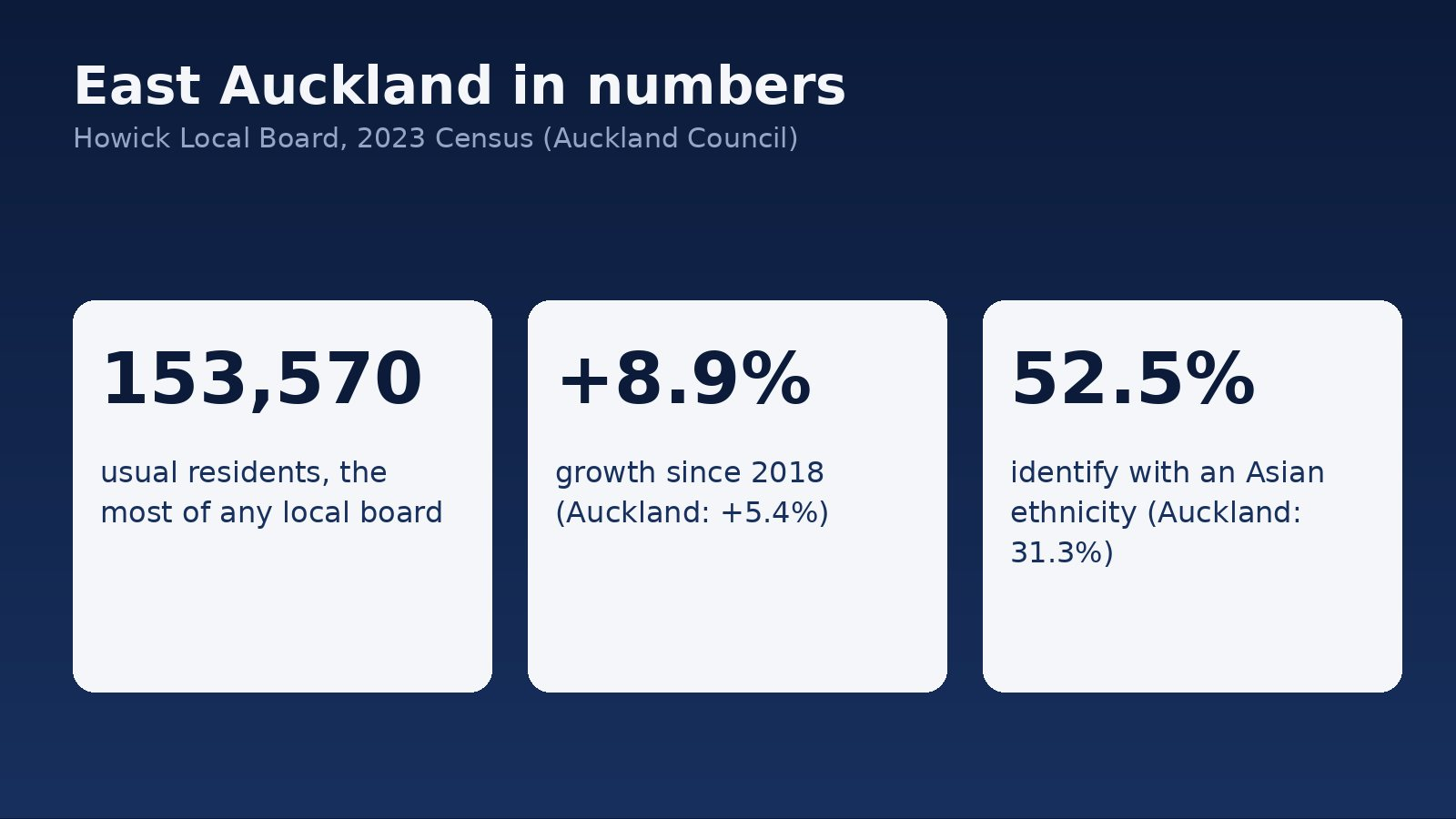
East Auckland is not a quiet corner. The 2023 Census counted 153,570 usual residents in the Howick Local Board area, the most of any local board in Auckland. That was up 12,600 people, or 8.9%, since 2018, against 5.4% growth across Auckland as a whole (Auckland Council, Howick 2023 Census summary).
The same summary shows a community that differs from the Auckland average. 52.5% of residents identified with an Asian ethnicity, compared with 31.3% across Auckland, and the Asian group grew by 15,024 people (22.9%) since 2018. Two thirds of dwellings (66.0%) were owned or held in a family trust, against 59.5% for Auckland, and the median age was 38.1 years against 35.9.
What does that mean for your business? Three practical things. First, there are a lot of new households each year who have no history with you, so they rely on what strangers say. Second, owners and families tend to be settled and spending on their homes, which suits trades, health, legal and financial services. Third, your customers come from many backgrounds, so a profile that is clear and easy to understand matters more than a clever one. We haven’t seen published figures on which languages East Auckland customers write reviews in, so we won’t guess. Ask your own customers what they’d find easiest.
Why reviews matter more than your website
Google says plainly that reviews feed into how it ranks local results. Its help pages describe prominence, one of three local ranking factors, as being based partly on how many reviews you have (Google Business Profile Help, Tips to improve your local ranking). That is Google’s own description of its own product, and it doesn’t tell you how much weight any one factor carries. What it does tell you is that reviews are not just decoration.
For the customer, reviews do a simpler job. They answer “will this business turn up, do the work and treat me fairly?” before the customer picks up the phone. A business with twenty recent, specific reviews answers that question. A business with two reviews from 2022 doesn’t.
Step one: ask every customer, the same way
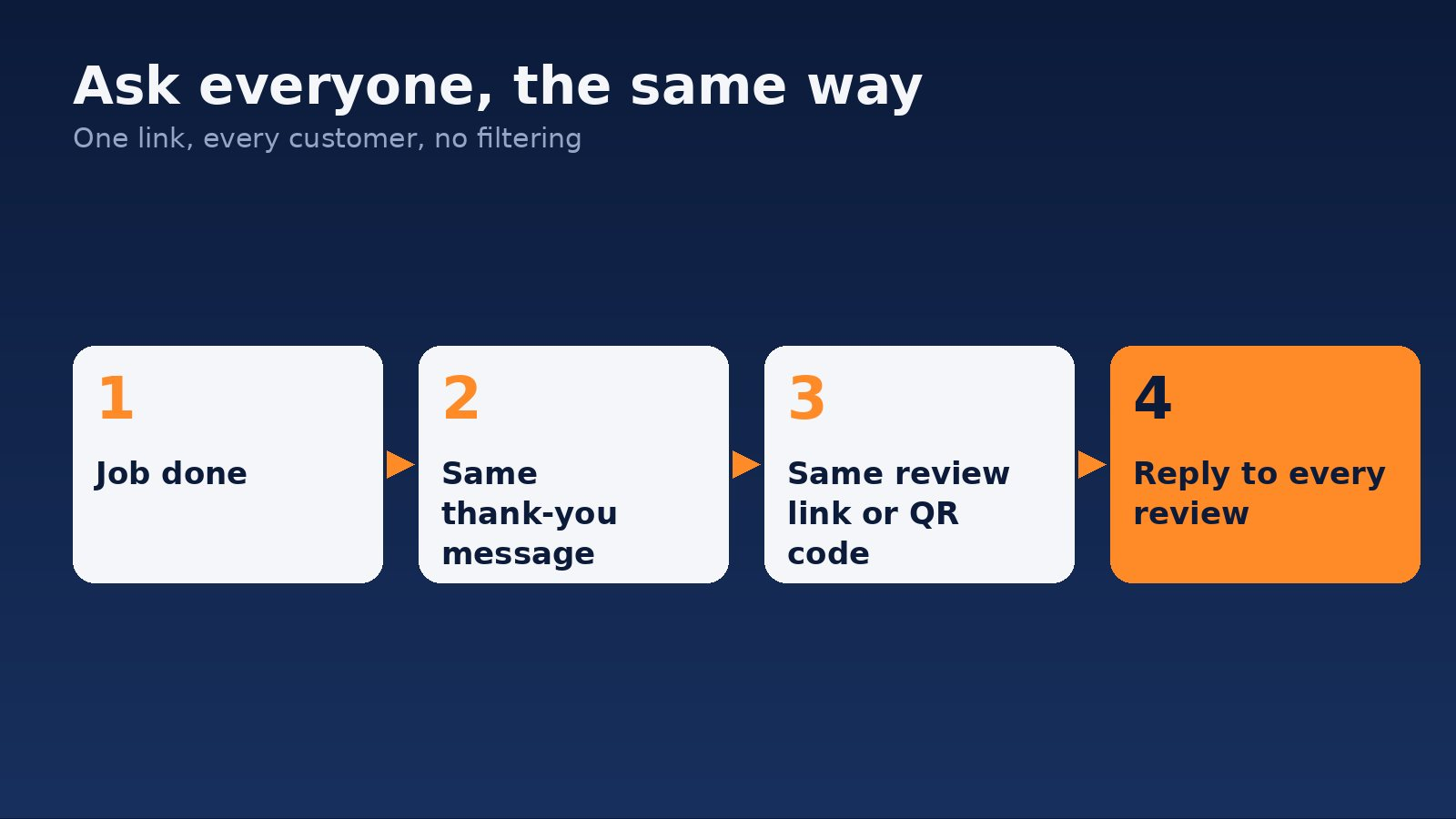
Google lets you ask. Its help page says you can ask customers to visit a Google link or scan a QR code to leave a review (Google Business Profile Help, Read and reply to reviews). The easiest way to do this in practice:
- Get your review link from your Business Profile and turn it into a QR code if you like.
- Put it in the message you already send when a job is done, or on the invoice, or on a card at the counter.
- Send it to every customer, not just the ones you think are happy.
That last point is the difference between a healthy profile and a risky one. Choosing who to ask based on how happy they seem is sometimes called review gating. Google’s own page doesn’t use that term, but its policy, as quoted in third-party guides, says businesses should not selectively solicit positive reviews. Even where the rule isn’t spelled out for your case, it’s the wrong habit: it makes your profile look better than your business is, and then your customers find out.
Step two: don’t pay for them
Offering something in return for a review is the fastest way to lose the value of the ones you have. Google’s help page lists “offering incentives, like free or discounted goods or services, in exchange for customers to post reviews” as strictly prohibited. That covers the discount, the free coffee and the prize draw.
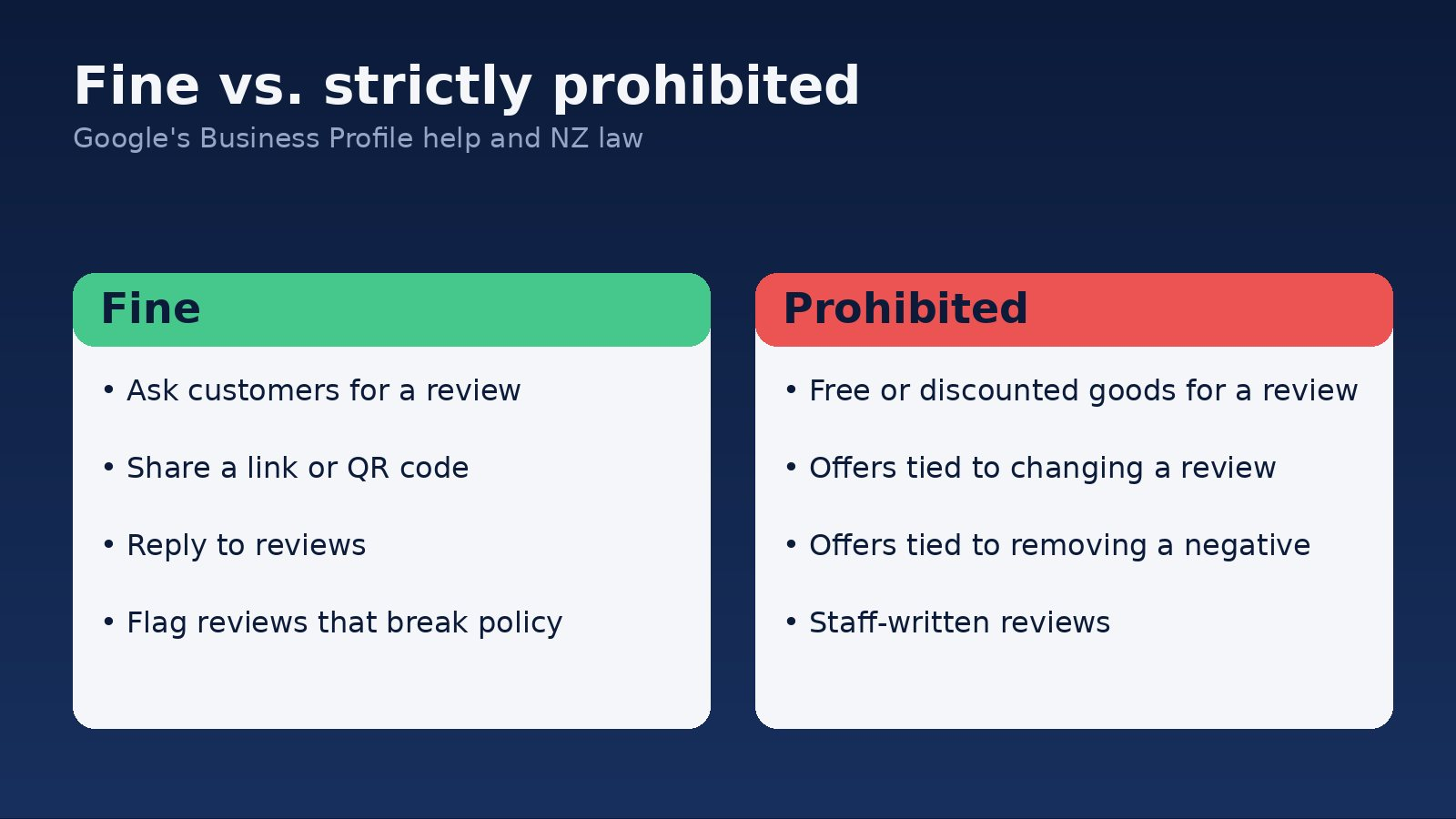
New Zealand law has teeth here too. The Commerce Commission has prosecuted a business over reviews, and we’ve covered what the case means for ordinary businesses in our guide to the NZ fake-review law. The short version: don’t write your own reviews, don’t have staff write them, and don’t hide the bad ones.

Step three: reply to every review, including the bad ones
Google says replying shows customers that their feedback matters. Its page recommends that you reply and share your perspective, and for negative reviews it advises you never share the reviewer’s private information, and suggests inviting complex issues to be resolved privately (Google Business Profile Help).
Here is how that looks for a Botany or Pakuranga business owner:
- A good review: thank them by first name and mention the job. Two sentences is plenty.
- A bad review: reply calmly and briefly. Say sorry for the experience, say you’d like to fix it, and give a phone number or email. Don’t argue and don’t put the customer’s details in public.
- A fake or abusive review: Google says you can flag a review you believe breaks its content policies. Do that instead of arguing in public.
A prospective customer reads the replies as closely as the reviews. A calm answer to a complaint often earns more trust than a perfect score.
What does it cost, and how long does it take?
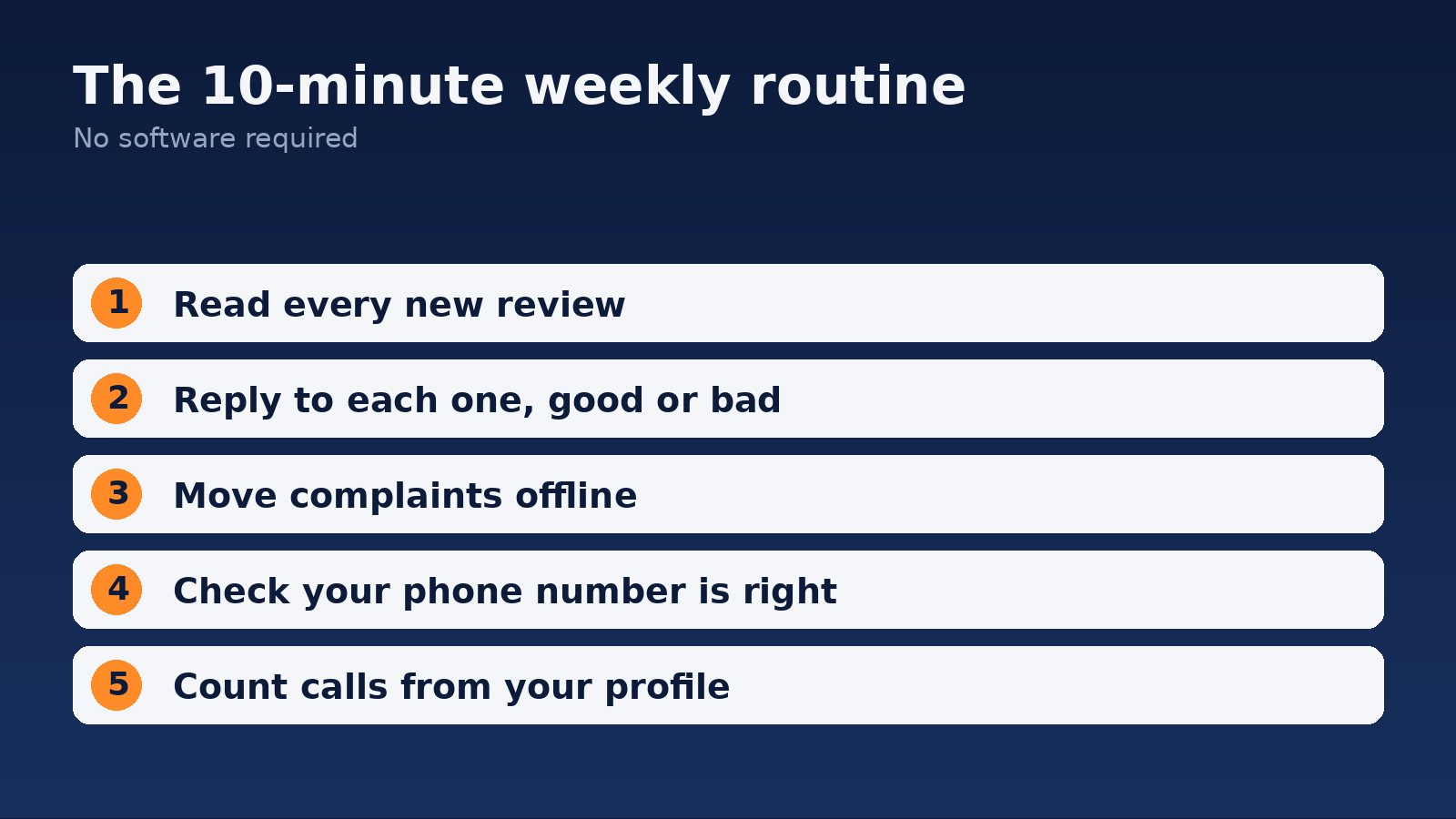
The basic routine costs nothing but time. Setting up your review link and message takes an afternoon. Keeping it going takes about ten minutes a week. You’ll see your review count rise within weeks if you ask every customer. Whether that lifts your calls depends on your market, and anyone who promises a number before looking at your profile is guessing.
How to know it’s working
Don’t judge by star rating alone. Check three things each month: how many new reviews arrived, whether you replied to all of them, and how many calls and direction requests your Business Profile recorded. Then ask new customers how they found you. If the phone is ringing more and customers mention your reviews, it’s working. If you also want the calls tracked properly, see which ads made the phone ring.
Where to start this week
- Get your review link from your Google Business Profile.
- Add it to your job-done message and send it to every customer.
- Reply to every review you already have, oldest first.
- Put ten minutes in your diary every week to repeat it.
If you’d rather hand this off, BeyondClix is an Auckland agency that works with local service businesses. See our reputation and digital marketing services or get in touch and we’ll tell you plainly what’s worth fixing first.
Frequently asked questions
Can I ask customers for Google reviews?
Yes. Google’s help page says you can ask customers to visit a Google link or scan a QR code. Ask every customer the same way.
Can I offer a discount for a review?
No. Google lists offering free or discounted goods or services in exchange for reviews as strictly prohibited.
Should I reply to negative reviews?
Yes. Google recommends replying, keeping the reviewer’s private details out of it and inviting complex issues to be resolved privately.
How many reviews do I need in East Auckland?
There is no magic number. Google says review count is part of prominence, but it doesn’t publish a target. Compare yourself with the three businesses customers would pick instead of you.
How long until reviews help my business?
Your review count can rise within weeks if you ask every customer. The effect on calls depends on your market, so track calls from your profile rather than guessing.
Sources
- Auckland Council: Howick Local Board, 2023 Census results
- Google Business Profile Help: Read and reply to reviews (vendor documentation)
- Google Business Profile Help: Tips to improve your local ranking (vendor documentation)
Want this run for your business?
Talk to our team. We will show you where the money is leaking and what we would do about it.